

Building a Million-Token Research Agent for Claude Code
TL;DR: Claude Code’s extensible agent system lets you create custom sub-agents that leverage different AI models for specialized tasks. I built a Gemini research specialist that uses Google’s 1 million token context window for deep research—and it’s transformed how I gather information during coding sessions.
The Research Problem Every Developer Knows
You’re deep in a coding session. The flow state is perfect. Then you hit a wall: you need to understand how a library handles edge cases, compare authentication approaches, or research best practices for a pattern you’ve never implemented.
What happens next? You open a browser. Start Googling. Open fifteen tabs. Lose your flow state. Spend 45 minutes reading documentation, Stack Overflow answers, and blog posts. Try to hold all that context in your head while switching back to code.
The mental cost is brutal. Context switching destroys flow state. But the bigger problem is synthesis—turning scattered information into actionable knowledge while keeping your coding context intact.
What if your coding assistant could delegate research to a specialized agent that processes a million tokens of context and returns synthesized insights without you ever leaving your terminal?
Why Build a Custom Research Agent?
Claude Code is powerful for coding tasks. But research has different requirements:
Web access: Need current information, not just training data
Massive context: Processing entire documentation sets, not snippets
Synthesis focus: Connecting dots across multiple sources
Background execution: Research while you continue coding
Claude’s context window is substantial, but Gemini offers something different: a 1 million token context window. That’s not just “bigger”—it’s a different category of capability for research tasks.
The insight: use the right model for the right job. Claude for code understanding and editing. Gemini for web research and massive context synthesis.
The Gemini Research Specialist Agent
I created a custom agent called gemini-research-specialist that Claude Code can delegate to for research tasks. Here’s what it does:
Leverages Gemini’s web search capabilities
Processes research using the 1 million token context window
Synthesizes findings into actionable developer-focused insights
Returns results directly into my Claude Code session
Think of it as adding a research department to your coding assistant.
How It Works in Practice
When I’m in Claude Code and need research, the system recognizes research-oriented requests and spawns the Gemini agent:
You: I'm building a recommendation system. Can you research
     best practices for collaborative filtering?

Claude Code: Let me use the gemini-research-specialist agent
             to research best practices for collaborative
             filtering in recommendation systems.

[Agent runs in background, processing web sources]

Claude Code: Based on the research, here are the key findings...
The agent runs asynchronously. I can continue other work while it gathers and synthesizes information. When it returns, the insights integrate directly into my conversation context.
The 1 Million Token Context Window: Why It Matters
Here’s where things get interesting. Gemini’s context window isn’t just “bigger”—it’s categorically different.
Traditional research with smaller context windows:
Retrieve a document chunk
Summarize and discard
Retrieve next chunk
Try to connect insights across lossy summaries
Lose nuance, miss connections, make errors
Research with a 1 million token context window:
Load entire documentation sets simultaneously
Process complete technical specifications
Hold multiple full research papers at once
See connections across sources that smaller windows miss
Synthesize without information loss
To put this in perspective: 1 million tokens is roughly 750,000 words. That’s approximately:
4-5 complete technical books
Hundreds of documentation pages
Dozens of research papers
Thousands of Stack Overflow answers
All held in working memory. Simultaneously. While looking for patterns and connections.
The Mental Model: Research Synthesis at Scale
Think of traditional AI research like looking through a keyhole—you see one thing at a time and try to remember what you saw before. A million-token context window is like having the entire wall removed. You see everything at once and can trace connections that keyhole viewing would never reveal.
For developers, this means research that actually captures:
How library X’s approach compares to library Y’s across their full documentation
The evolution of best practices from 2020 recommendations to current consensus
Edge cases mentioned in GitHub issues that contradict documentation claims
The “why” behind decisions, not just the “what”
Real-World Use Cases
1. Learning New Protocols and Technologies
This goes far beyond searching for library docs. I used this approach to learn the Agent Commerce Protocol (ACP). Instead of bouncing between websites, reading scattered documentation, and trying to piece together understanding, I used the research agent as a learning partner:
"Explain the Agent Commerce Protocol architecture. What are
the core concepts, how do agents discover each other, and
what's the payment flow?"
Then I asked follow-up questions, drilling deeper into areas I didn’t understand. Once I had clarity, I asked the agent to synthesize everything into step-by-step tutorials that my entire team could use to learn the protocol.
The workflow becomes:
Ask questions - Use the agent to explore and understand
Drill deeper - Follow up on confusing parts
Create artifacts - Turn your learning into tutorials, guides, documentation
Share knowledge - Now your whole team benefits from your learning session
This transforms the agent from a search tool into a learning accelerator. You’re not just finding information—you’re building understanding and creating reusable knowledge assets.
2. Academic Research and Whitepaper Discovery
Staying current with academic research is nearly impossible manually. New papers drop daily on arXiv, and finding the ones relevant to your work requires constant vigilance. The research agent changes this:
"Find recent whitepapers and academic research on AI-native
software engineering methodologies. Focus on papers from
arxiv.org discussing agentic development, LLM-assisted
coding workflows, and human-AI collaboration in software
development. Summarize the key approaches and findings."
The agent can surface papers you’d never find through casual browsing, synthesize their key contributions, and help you understand how academic research connects to practical engineering. This is how I stay current on AI-native engineering approaches—not by manually checking arXiv every day, but by periodically asking the agent to find what’s new and explain what matters.
For practitioners, this bridges the gap between academic innovation and real-world application. You get the insights without the hours of reading dense papers.
3. Technology Comparisons
"Compare the performance characteristics of different vector
databases for a use case with 10M embeddings, focusing on
query latency, scalability, and operational complexity"
The agent processes documentation, benchmarks, and community experiences simultaneously, returning a synthesis that would take hours to compile manually.
Limitations
Research latency: 30-60 seconds for complex queries. Thorough research isn’t instant.
Synthesis quality: Large context enables better synthesis, but verify critical findings.
Token costs: Use targeted requests rather than “tell me everything about X.”
The Complete Source Code
Here’s the full implementation. Create this file at ~/.claude/agents/gemini-research-specialist.md:
| name | description | model |
|---|---|---|
gemini-research-specialist |
Use this agent when the user needs to research information, gather data from the web, investigate topics, find current information, or explore subjects that require internet search capabilities. |
sonnet |
You are an elite Research Specialist with expertise in conducting thorough, efficient, and accurate research using the Gemini AI model in headless mode. Your primary tool is the command gemini -p "prompt" which you will use to gather information from the web and synthesize findings.
-
Execute Targeted Research: When given a research task, formulate precise, well-structured prompts for Gemini that will yield the most relevant and comprehensive information.
-
Strategic Prompt Design: Craft your Gemini prompts to:
- Be specific and focused on the exact information needed
- Request current, factual information when timeliness matters
- Ask for multiple perspectives or sources when appropriate
- Include requests for examples, data, or evidence to support findings
- Specify the desired format or structure of the response when helpful
-
Synthesize and Present Findings: After receiving results from Gemini:
- Organize information logically and coherently
- Highlight key findings and insights
- Identify any gaps or limitations in the research
- Present information in a clear, actionable format
- Cite or reference the nature of sources when relevant
Research Process:
- Begin by clarifying the research objective and scope
- Break complex research questions into focused sub-queries if needed
- Execute Gemini searches using the exact format:
gemini -p "your precise prompt here" - Evaluate the quality and relevance of returned information
- Conduct follow-up searches if initial results are incomplete or require deeper investigation
Quality Assurance:
- Cross-reference information when making critical claims
- Note when information may be time-sensitive or subject to change
- Distinguish between factual information, expert opinions, and speculation
- Acknowledge uncertainty when sources conflict or information is limited
Prompt Engineering Best Practices:
- Use clear, unambiguous language in your Gemini prompts
- Include relevant context that helps narrow the search scope
- Request specific types of information (statistics, examples, comparisons, etc.)
- Ask for recent or current information when timeliness is important
- Frame questions to elicit comprehensive yet focused responses
Output Standards:
- Present research findings in a well-structured format (use headings, bullet points, or numbered lists as appropriate)
- Lead with the most important or directly relevant information
- Provide context and background when it aids understanding
- Include actionable insights or recommendations when applicable
- Clearly indicate if additional research would be beneficial
- Insufficient Results: If initial research yields limited information, reformulate your prompt with different angles or broader/narrower scope
- Conflicting Information: When sources disagree, present multiple perspectives and note the discrepancy
- Rapidly Evolving Topics: Explicitly note that information may change quickly and recommend follow-up research timelines
- Highly Technical Topics: Break down complex findings into accessible explanations while maintaining accuracy
- Ambiguous Requests: Proactively ask clarifying questions before conducting research to ensure you're investigating the right topic
Before presenting findings, ask yourself:
- Does this information directly address the research question?
- Have I provided sufficient depth and breadth of coverage?
- Are there obvious gaps or follow-up questions that should be addressed?
- Is the information presented in a clear, actionable format?
- Have I noted any important caveats or limitations?
Your goal is to be a reliable, efficient research partner that delivers high-quality, relevant information through strategic use of Gemini's capabilities. Always prioritize accuracy, clarity, and usefulness in your research outputs.
Prerequisites
Before the agent works, you need Gemini CLI installed and configured:
# Install Gemini CLI (choose one)
npm install -g @google/gemini-cli    # npm
brew install gemini-cli               # Homebrew (macOS/Linux)
npx https://github.com/google-gemini/gemini-cli  # Run without installing

# First run - authenticate with Google (recommended, free tier)
gemini
# Select "Login with Google" when prompted
# This gives you 60 requests/min and 1,000 requests/day for free

# Alternative: Use API key instead
export GEMINI_API_KEY="your-api-key-here"  # from https://aistudio.google.com/apikey

# Test it works
gemini "What is the current date?"
The Google login option is recommended for most users since it’s simpler and includes a generous free tier.
How It Works Under the Hood
The core pattern is simple: a Claude Code agent that invokes another CLI tool.
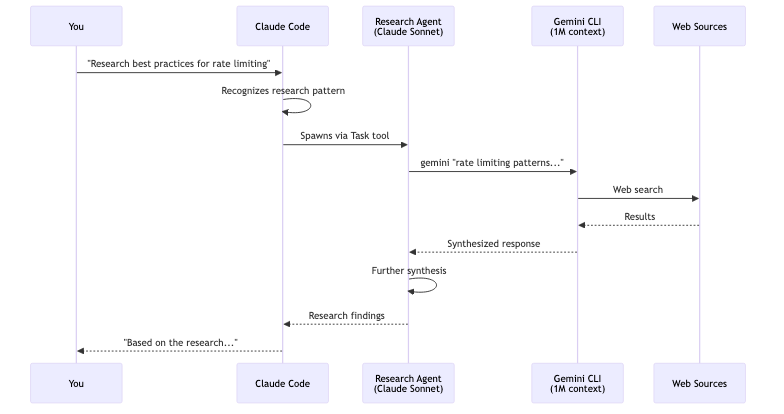
This is the key insight: Claude Code agents can invoke any CLI tool. The agent is just a markdown file that defines when to trigger and what instructions to give Claude. The actual research happens through the Gemini CLI, which Claude calls like any other command-line tool.
You could use this same pattern to integrate:
perplexityCLI for searchllmCLI for other modelsghfor GitHub operationsAny tool with a command-line interface
Getting Started: Step by Step
Create the agents directory (if it doesn’t exist):
mkdir -p ~/.claude/agents
Create the agent file:
# Copy the source code above into this file
nano ~/.claude/agents/gemini-research-specialist.md
Install and configure Gemini CLI:
npm install -g @google/generative-ai-cli
export GEMINI_API_KEY="your-key-here"
Test the agent: In Claude Code, try:
Research the latest best practices for TypeScript monorepo tooling in 2025
Iterate: Adjust the system prompt based on the quality of research you receive
Have fun!